Skip to content
NOOLERP

Billing & stock software for garment shops

Billing, stock and accounts
for your garment shop.

Know exactly what is on your shelves and what is not selling. See today’s sales and cash from wherever you are. Never sit down at night to do the accounts — they are already done. One software, on a computer in your shop, that keeps working when the internet goes.

Pay
once, not monthly
Keeps billing
without internet
Your figures
stay in your shop
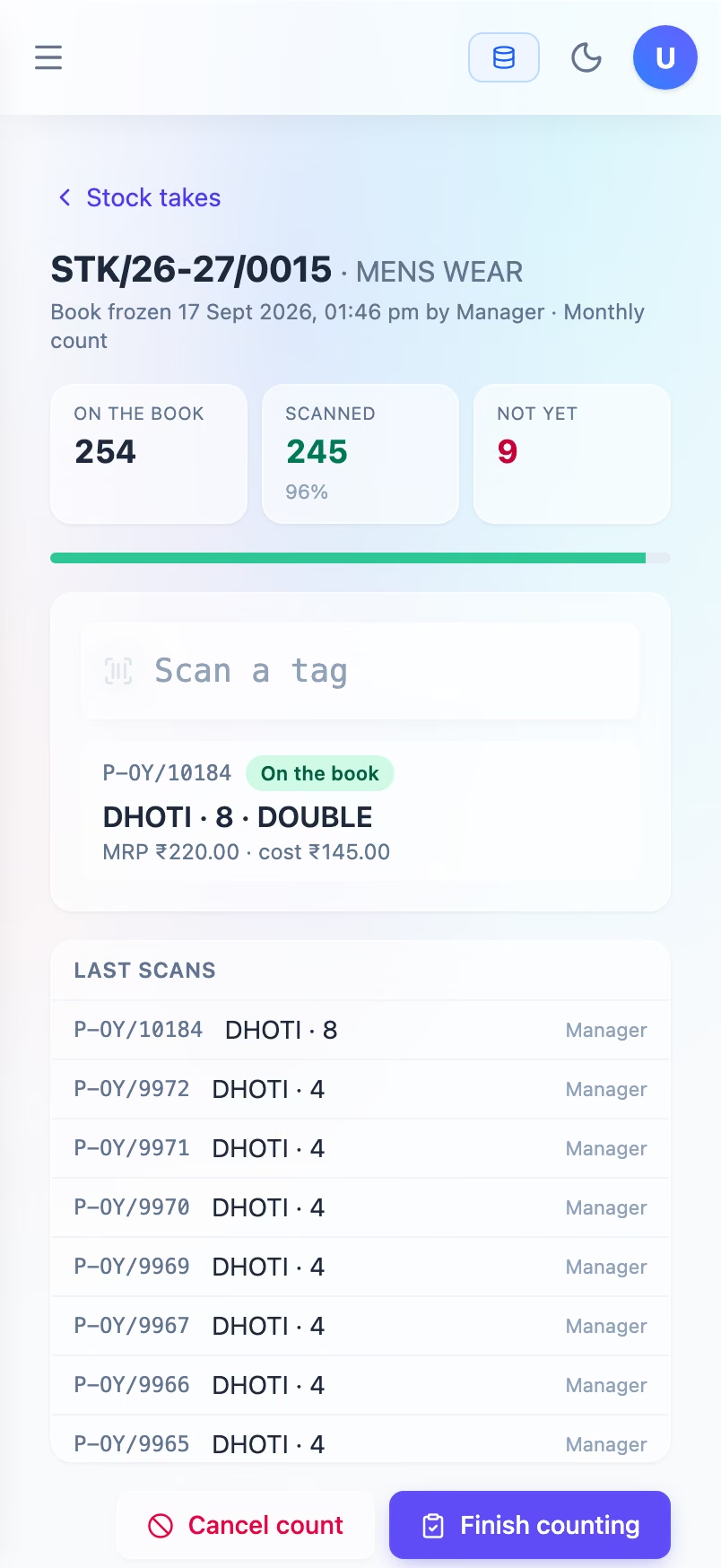
The Nool billing counter on a laptop: five garments scanned onto a bill, each line showing its own tag number, with the total of ₹1,008 ready to take.
Nool on a phone: the stock list, with pieces in stock, their value and what is running low.

Built by CodeFarmers OPC Pvt Ltd · +91 90809 71322

What it does

Everything the shop runs on, in one software.

Not a billing app with extras added on. The counter, the stock, the price tags, the supplier bills and the accounts are one thing — so a sale at the counter is in your stock and in your accounts at the same moment, without anyone doing anything.

  • The Nool billing screen in dark mode, with five scanned garments on the bill, each line showing its own tag number.

    01

    Billing counter

    Scan the tag, take the money, hand over the bag. The counter does the rest.

    See how

  • The Nool supplier bill entry screen with supplier, bill number and items filled in.

    02

    Supplier bills & tags

    Type in the supplier's bill without touching the mouse. The tags print in the same order as the paper.

    See how

  • The Nool stock list showing items with quantities, values and low-stock warnings.

    03

    Stock

    Stock that is always exactly right — and a stock count you can do with a phone, while the shop is open.

    See how

  • The balance screen showing what the shop owns, owes, earned and spent, adding up exactly.

    04

    Accounts

    You never sit down to 'do the accounts'. Every sale, purchase and expense goes into the books the moment it happens — and the GST return figures are ready when your accountant asks.

    See how

  • The salesman report showing bills, pieces sold, returns and net sales for each salesman.

    05

    Reports

    Who sold what, which counter took what, and whether the cash matched.

    See how

  • The items list showing item codes, names, selling prices and status.

    06

    Setup & staff

    Set up your items and your staff once. Decide who can see what. Know who changed what, and when.

    See how

Watch it work

Not a tour. The real thing.

These are recordings of Nool actually running, with a month of shop data in it. Nothing is staged, and nothing here is a drawing of a screen that does not exist.

At the counter

Scan the tag. The bill is done.

Every tag belongs to one piece, so the counter never asks which size or which colour — it already knows. The price on the tag is the price on the bill, and the GST inside it is worked out for you.

Each line
One piece, one tag
GST
Worked out for you
Three shirts scanned. Each line is one piece, and the ₹330 on its tag already includes ₹15.72 of GST.

Entering a supplier bill

A supplier bill goes in as fast as you can read it.

Arrow keys move you through the bill like a spreadsheet, with no mouse. Change one price and the cost, margin and tax fix themselves.

Typing
Keyboard only, no mouse
All sizes
Entered in one go
Changing one MRP. The cost, margin and tax columns update on their own as it is typed.

At the end of the day

Today's sales, without asking anyone.

Nothing on this screen is typed in. The day's sales, the number of bills and the trend come straight from what was billed at the counter. What you see is what was actually sold.

Comes from
The bills themselves
Stock
Exact, never estimated
Switching between a day, a week and a month of sales — ₹32,445 across 122 bills.

Where it runs

In your shop.
On your computer.

Nool is installed on a computer in your shop, not rented from a company’s cloud. Your sales figures stay with you, and billing depends on your own Wi-Fi, not on the internet.

YOUR SHOPkeeps billing with the internet downNool’s computerin your shop, owned by youCounter 1billingCounter 2weekendsOfficesupplier billsStaff phonesstock checksSECURE LINKSecond shopbranchYour phoneanywhereprivate and secure —never open to the internet

Swipe left for the second shop and your phone →

On your own computer
Your figures live on a computer you own, in your shop. It starts by itself after a power cut.
Every device in the shop
The counter, the office computer and your staff's phones all use it over the shop's own Wi-Fi.
A second shop, or you at home
Another branch, or you at home, can see the same shop through a secure connection. This is what we recommend once there is a second location.
When the internet goes
Billing carries on, because the counter never needed the internet. Only checking from outside waits for the line to come back.

Why it is not in the cloud, where the backups go, and what happens when the internet goes

Every screen in the shop

The same shop, on whatever you are holding.

One Nool that fits the screen it is on: a phone for checking stock on the floor, a tablet at the counter, a laptop in the office. These are shown at their true sizes next to each other.

  • Nool on a mobile phone — counting stock on the shop floor
    Mobile phoneCounting stock on the shop floor
  • Nool on a tablet — billing at the counter
    TabletBilling at the counter
  • Nool on a laptop or desktop — the office, at the end of the day
    Laptop or desktopThe office, at the end of the day

Pricing

Bought once.
Not rented monthly.

From ₹24,000, paid once. You pay for Nool once, per shop, and it is yours. No monthly fee, no charge per user, and nothing switches off if you stop paying. Yearly support and updates are optional.

  • Group

    Up to 5 devices, multiple locations

    More than one shop, or an owner who wants to see the shop from home.

    ₹1,24,000

    One time · per shop · excl. GST

    Support and updates after year one: ₹24,000 a year, optional.

    • A secure connection, so branches and your own phone can use the same Nool
    • Stock, sales and cash for each branch on its own
    • One set of accounts across all your shops
    • Priority support
    • And everything in Shop and Counter, below
    Ask about Group
  • Shop

    Up to 5 devices

    One shop with two or more counters, or a counter and a separate office.

    ₹63,000

    One time · per shop · excl. GST

    Support and updates after year one: ₹11,000 a year, optional.

    • A separate computer for Nool, so billing carries on if any one machine fails
    • Two or more counters, each with its own cash drawer and cash close
    • Each member of staff sees only what you allow
    • Backs itself up every night, with a copy to your Google Drive; we test a restore at handover
    • And everything in Counter, below
    Ask about Shop
  • Counter

    2 devices

    One shop with one billing counter, and the office on the same computer or one next to it.

    ₹24,000

    One time · per shop · excl. GST

    Support and updates after year one: ₹6,000 a year, optional.

    • Billing, supplier bills, stock and accounts — everything, nothing held back
    • Prints barcode tags and bills
    • Runs on one shop computer; staff phones can use it over the shop's Wi-Fi
    • We install it, set up your items and design your tag
    • First year of updates and support included
    Ask about Counter

What you get, what you do not, and what the others cost

Who built it

A new product. Not new hands.

CodeFarmers OPC Pvt Ltd is a young company, and we would rather say so than dress it up. What is not young is the experience behind Nool: 10 years of building and supporting software for shops before a line of this one was written.

Nool was built inside a real cloth shop, for the way that shop actually works — a tag on every piece, printed at the counter, bills entered by keyboard, and accounts that always add up. It was not general software adjusted for garments afterwards.

You will not find customer counts, uptime percentages or testimonials on this site. When there are real ones, they will appear here with names against them.
What runs quietly in the background

Backups
Every night, on the shop computer, with a copy sent to your own Google Drive on a schedule. Any time you like, a copy to a pen drive or external disk you take home. We restore one at handover, so you know it works.
Health checks
It checks itself on a schedule, so a computer nobody looks at for a month is still one you can trust.
Power cuts
It starts with the computer and comes back on its own. Nobody has to log in.
Updates
An update either finishes completely or does not happen. It cannot leave things half done.
Testing
Around 55 sets of automatic tests check prices, tax, stock and accounts every time we change anything.
Printing
Bills and tags go straight to the printer. No pop-up boxes, no choosing a printer.

Come and see it work on your own stock.

The quickest way to judge Nool is to watch one piece go from your supplier's bill to a printed tag to a customer's bill. That takes about ten minutes.